If you opened your Fansly statistics recently and everything looked different, you did not click the wrong thing. Fansly has launched a new Statistics page, currently in beta. It brings your content, audience and earnings numbers together in one place and compares every number with the period before.
More numbers only help if you know what to do with them. This guide explains what is new, how to read the most important figures as one path from first view to paying fan, and how to turn them into decisions in about 20 minutes a week. Along the way you will find a Free cheat sheet to save. Still deciding between platforms? Our comparison of Fansly, Fanvue, MYM and OnlyFans helps with that.
What is new (and why "beta" matters)
According to Fansly's help center, the new Statistics page arrived in September 2026 and is in beta. Fansly says it "may change as we add features based on your feedback". So treat everything below as the state at the time of writing, and check Fansly's help article if something looks different.
What Fansly describes:
- One page, four tabs: Overview, Content, Audience and Earnings. The existing Profile Statistics and Earning Statistics menu items now open this page. You can also go straight to fansly.com/creator/stats.
- Overview cards for Earnings, Views on For You, Views on Timeline, Unique viewers on For You, Profile visits, Follower growth, New subscribers and Paying fans.
- Built-in comparison: you choose 7 days, 30 days, 90 days or a custom period, and each number is compared with the period of the same length right before it.
- More detail per tab: for example where profile visits come from (Search, For You, Direct, Suggestions, Other), a heat map of when your audience watches, hashtag results, renewal rate, and earnings by product.
- Legacy pages: if your account was created before 21 September 2026, Fansly says you can still open the old pages from your Creator Dashboard, marked "Legacy".
Three details from the help article are easy to miss:
- Custom periods and daily numbers use UTC days, not your local time. Totals for "yesterday" in your own time zone can look slightly different.
- Follower and subscriber counts update once a night. Most other numbers update within minutes.
- View statistics only go back to late June 2026. Earlier periods show no view data, while your earnings history is complete.
Read your stats as one path
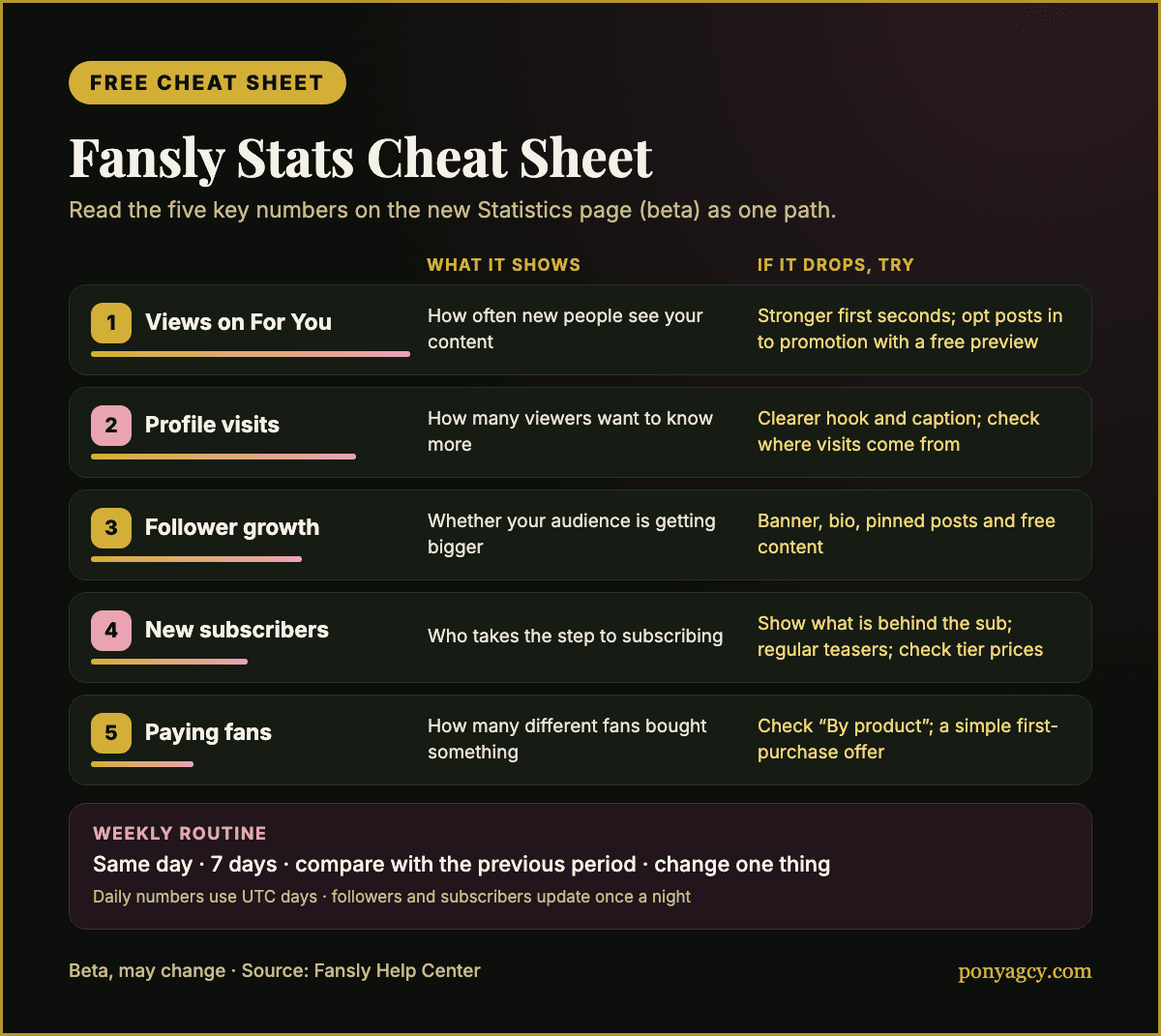
Five of the overview numbers belong together. Read them as steps a fan takes, from seeing you for the first time to paying you:
FYP views → profile visits → follower growth → new subscribers → paying fans
This is our way of reading the page, not a Fansly report. It works because each step tells you where people stop. A drop in paying fans means something different when your FYP views also fell than when everything above stayed stable.
1. Views on For You
The For You Page (FYP) is Fansly's built-in discovery feed. Fansly's help center explains that only posts you opt in to promotion are included, and that locked media without a free preview is not eligible.
How to read it: this is the top of your path, how often new people get to see your content at all. Look at the change against the previous period and at Unique viewers on For You: many views from few unique viewers means the same people are watching repeatedly; growing unique viewers means you are reaching new people.
What you can decide: in the Content tab, check which media performs best on For You and how much of it people watch. Make more of what holds attention, and make sure the posts you want discovered are actually opted in and have a free preview.
2. Profile visits
How to read it: profile visits show how many viewers want to know more about you. The Audience tab shows where those visits come from: Search, For You, Direct, Suggestions and Other.
What you can decide: if FYP views go up but visits from For You do not, your content gets seen but does not make people curious about you. Test clearer hooks: a face or signature look in the first second, a caption that hints at what your page offers. If visits from Direct rise after you promote your link elsewhere, that promotion is working.
3. Follower growth
How to read it: follower growth tells you whether your audience is getting bigger. The Audience tab also shows new followers and unfollows as separate numbers, so you can see whether a weak week came from fewer new followers or from more people leaving. "Followers discovery brought you" shows who followed after finding you through For You, Suggestions, Search or one of your links.
What you can decide: many profile visits but little follower growth usually point to your profile itself. Check your banner, bio, pinned posts and free content. Someone who lands on your page should understand within seconds what they get and why to follow. Rising unfollows after a certain kind of post are worth noticing too.
4. New subscribers
How to read it: this shows how many people took the step from following to subscribing. The Audience tab adds renewal rate, expired and cancelled subscriptions, and subscribers by tier.
What you can decide: lots of followers but few new subscribers usually means the reason to subscribe is not clear yet. Show followers what is behind the subscription, plan regular teasers, and check your tier prices. A falling renewal rate is a signal to look at what subscribers get after they join, not only at how you win new ones.
5. Paying fans
According to Fansly, paying fans are the number of different fans who made a purchase in the period. Earnings on this page is your net revenue after Fansly's share and any refunds. The Earnings tab adds new paying fans, average per paying fan, earnings by product and your top supporters.
How to read it: paying fans and average per paying fan together explain your earnings. More earnings from fewer paying fans means you rely on a few big supporters. That can be fine, but it is a risk if one of them stops.
What you can decide: if earnings depend on very few fans, work on bringing more followers and subscribers to a first purchase. If many fans pay small amounts, look at "By product" to see which offers (media, tips, subscriptions, media sets, stream tickets) actually sell, and build on those.
Use the previous-period comparison properly
The built-in comparison is the most useful part of the new page, and the easiest to misread.
- Compare like with like. Choose the same length each time, for example always 7 days for your weekly check and 30 days once a month.
- Watch the calendar. A 7-day period that includes a holiday, a launch or a payday weekend compares badly with a quiet week. Note what you did differently.
- Look for direction across several steps. One number moving is noise more often than a trend. If FYP views, profile visits and follower growth all fall together, the problem is probably at the top of the path.
- Mind the UTC days and the nightly update for followers and subscribers before you judge a single day.
A weekly 20-minute routine
- Same day, same period. Open Overview once a week and select 7 days.
- Note five numbers with their change: Views on For You, Profile visits, Follower growth, New subscribers, Paying fans. A simple note or spreadsheet is enough.
- Find the weakest step. Where does the change look worst, or where does the path narrow most compared with your own earlier weeks?
- Open the matching tab. Content for views, Audience for visits, followers and subscribers, Earnings for paying fans.
- Pick one change for the coming week, for example a different hook for FYP clips, a new pinned post or a new offer. Only one, so you can see whether it worked.
- Check posting times in "When your audience watches" and plan the week's posts around the brighter hours.
- Once a month, switch to 30 days and look at Monthly statements and the renewal rate.
Where Pony fits
Reading statistics is one thing. Turning them into content, messages, prices and promotion every single week is a job of its own. That is what Pony Agency does for adult creators on OnlyFans, Fansly and MYM: a personal manager, fan messaging, content and pricing strategy, posting-time analysis, promotion and privacy support including DMCA takedowns.
For full management, the split is 60% to Pony Agency and 40% to the creator, calculated on net revenue after platform fees and any chargebacks or reversals. The agreement is non-exclusive and either side can end it with 30 days' notice. Your content stays yours, and accounts you already have stay yours.
If you want someone to read your numbers with you and act on them, apply for a fit review. An application starts a conversation, and you decide whether it goes further.
Sources
Accessed 2026-10-21.
- Fansly Help Center: Your Statistics Page (Beta) (updated 30 September 2026)
- Fansly Help Center: For You Page (FYP)
- Fansly Help Center: How Fansly's recommendations work
Cover and cheat sheet graphics: Pony Agency. Fansly is a trademark of its owner; Pony Agency is not affiliated with Fansly.