Most creators set up their profile once, on the day they open the account, and never look at the settings again. That's a shame, because a few switches decide who can find you, who you can message and how easy it is for a new fan to say yes.
This free checklist goes through those settings one by one. For each point we tell you where OnlyFans itself describes it, and how old that description is. OnlyFans changes its interface from time to time, so a menu may be named slightly differently in your app today. If you can't find something, search the settings for the key word.
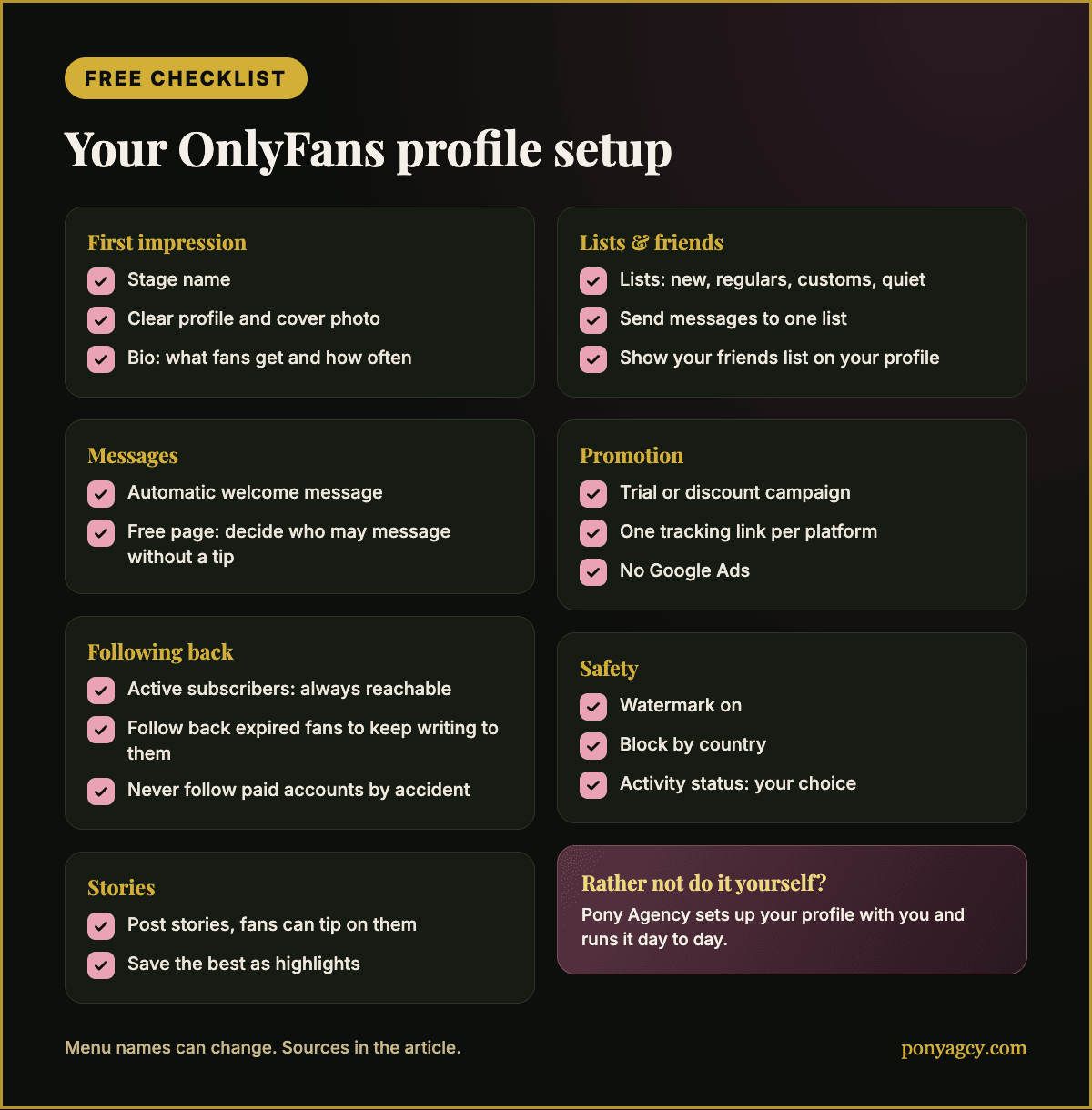
1. The first impression: name, photos, bio
When someone opens your profile, OnlyFans' own blog says they see three things first: "your profile photo, your cover photo, and your bio" (2022).
- Use a stage name. OnlyFans recommends it for your privacy. If you're still working out how private you want to be, our guide to OnlyFans without showing your face helps.
- Choose a clear profile photo and a cover photo that shows your style. They're the first thing a visitor sees, on your page and in links.
- Write a bio that says what fans get. OnlyFans allows up to 1,000 characters, and in 2022 it suggested keeping your bio around 160 characters to help with search engines. Say what you post, how often, and what's possible in messages.
2. Messages: welcome every new fan
- Set up an automatic welcome message. OnlyFans describes it as "Automatic Welcome Message" and says to head to "Chats" in your settings. Every new subscriber gets it straight away. Our free mass message cheat sheet has five welcome texts you can use.
- Free page? Decide who may message you without a tip. In 2021 OnlyFans explained that free accounts can choose not to accept messages without a tip from viewers they don't follow back, under Settings > Chats.
3. Following back: what it really does
You may have heard "follow back all your fans so you can always message them". That's only half right.
- Active subscribers you can always message, including by mass message. You don't need to follow them for that.
- Following back matters for fans whose subscription has expired. On OnlyFans, "following" someone means subscribing to their account, which is free for fan accounts. According to creator tool providers such as Supercreator, following an expired fan lets you keep messaging them, for example with a welcome-back offer. OnlyFans itself doesn't explain this in a guide we could find.
- There's a built-in switch for it. Tool providers describe it as "Auto follow back for the duration of subscription" under Settings → Fans and Following. As the name says, it follows fans for as long as they're subscribed.
- Watch the limits. Tool providers report a daily limit on how many accounts you can follow. And if you follow an account with a paid subscription, you pay for it, so don't follow other creators by accident.
4. Lists: message the right people
- Create your own lists. In 2022 OnlyFans described "Lists" in the menu behind your profile picture, between "Vault" and "Settings". There you can create custom lists and add or remove accounts. You can also add someone to a list with the star icon next to their name.
- Send messages to a list. OnlyFans says that after writing a message you can send it "only to subscribers in a particular list", and its current feature guide says you can organise fans into lists for "messaging, promotions, and live streams".
- Useful lists to start with: new subscribers, regulars, fans who buy customs, fans who've gone quiet. That way a welcome-back message never lands with someone who bought something yesterday.
5. Friends: show other creators on your profile
- Display your friends list. In 2022 OnlyFans explained that "you can display your friends list as a column on your profile page". It's an easy way to show creators you work with and promote each other.
- Collaborations need release forms. If you post content with another person, OnlyFans requires you to tag them, and people who aren't creators on OnlyFans have to verify their identity. Without that, OnlyFans says, "your content will not be posted". Our guide for couples on OnlyFans explains consent and verification.
6. Stories and highlights
- Post stories. You start one with "Add to story" at the top of your timeline. Stories are visible for 24 hours, and OnlyFans says fans can tip directly on your story.
- Turn your best stories into highlights. Past stories are kept in your "Story archive". From there you choose "Create highlight" and "Add to highlight", and they stay on your profile beyond 24 hours. Highlights like "Tip menu", "Customs" or "Start here" give new visitors a quick tour.
7. Promotion: trial links, campaigns, tracking
- Run a promotion campaign. OnlyFans describes it under Settings → "Subscription price and bundles" → "Start Promotion Campaign": you choose a free trial or a first-month discount. According to OnlyFans, a discount can be between 5% and 100% off your normal price for up to 30 days. Our comparison of free trial links and paid links in your bio helps you decide which suits you.
- Create a tracking link for every platform. In your profile settings, OnlyFans describes "Tracking links" under the Subscription header, with "Create New Tracking Link". One link for Instagram, one for X, one for Reddit: then your statistics show which platform brings fans.
- Paid page? Offer bundles. In 2022 OnlyFans described subscription bundles for 3, 6 or 12 months under "Promotions". They're not available for free accounts.
- Connect X (Twitter). Under Settings > Account you can link your X account and share a preview post.
- Know the one big promotion rule. OnlyFans' terms say: "Do not promote your OnlyFans account using Google Ads or any similar advertising platform or search engine advertising service."
8. Tips and safety
- Make sure tips are possible. According to OnlyFans, profiles with at least five posts can be eligible to accept tips. Tips are also where tip games start.
- Switch on your watermark. Under Settings → "Privacy and safety" → "Watermarks". By default it shows your profile link, which makes leaked content easier to trace back. If it happens anyway, our guide on leaked content explains what to do.
- Block countries where you don't want to be seen. OnlyFans calls the setting "Block By Country" in your privacy and security settings. Useful if you don't want to be found in your home country.
- Decide about your activity status. In 2022 OnlyFans described an option to hide "Show activity status" under "Privacy and safety".
What isn't on this list, and why
We only list settings we could trace to OnlyFans or to well-known creator tools. A few popular tips didn't make it:
- A ring around your profile picture from stories. Many creators say an active story makes your profile picture stand out. We couldn't find a source that describes how this looks today, so we're not promising it.
- A switch to hide your profile from suggestions. There are signs it exists, but we couldn't confirm its name in the app.
- Exact image sizes for profile and cover photos. We didn't find an official source. Use a sharp, high-resolution picture and check how it looks on your phone and your computer.
More free resources from Pony
- Free OnlyFans mass message cheat sheet: 50 messages and captions
- Free OnlyFans tip games guide: spin the wheel, pick a present, roll the dice
- Free OnlyFans content calendar 2026 with caption ideas
Or let someone else do all of this
A good setup is a start. After that come the daily work: lists to keep up to date, expired fans to win back, campaigns to test, stories to post.
Pony Agency manages OnlyFans, Fansly and MYM for adult creators, with a personal manager, fan messaging, content and pricing strategy, posting-time analysis, promotion and privacy support including DMCA takedowns. We set up your profile with you and take care of it from then on.
For full management, the split is 60% to Pony Agency and 40% to the creator, calculated on net revenue after platform fees and any chargebacks or reversals. The agreement is non-exclusive and either side can end it with 30 days' notice. Your content stays yours, and accounts you already have stay yours.
If you want all of this work taken off your plate, apply for a fit review. An application starts a conversation, and you decide whether it goes further.
Sources
Accessed 2026-10-21. onlyfans.com and blog.onlyfans.com were down that day, so we read OnlyFans' own guides via the Wayback Machine. The year of each guide is in brackets.
- OnlyFans blog: Creator Center (copy of September 2025): Block By Country, promotion discounts, release forms, X link, tips after five posts, free vs. paid pages
- OnlyFans blog: Ultimate guide to OnlyFans features (copy of June 2026): automatic welcome message, lists for messaging, mass messages
- OnlyFans blog: OnlyFans campaigns (copy of May 2026): tracking links
- OnlyFans blog: How to promote your OnlyFans profile (2024): promotion campaigns, watermarks
- OnlyFans blog: How to use lists on OnlyFans (2022): lists, friends list
- OnlyFans blog: How to use the story feature (2022): stories, story archive, highlights
- OnlyFans blog: Bio ideas (2022): profile photo, cover photo, bio length
- OnlyFans blog: Protecting your online identity (2022): stage name, activity status
- OnlyFans blog: Subscription bundles (2022)
- OnlyFans blog: Using messages on OnlyFans (2021): messages without a tip on free accounts
- OnlyFans: Terms of Use (copy of February 2026): Google Ads rule
- Supercreator: Expired fans automation and Supercreator: Auto follower guide: following back expired fans, daily limits
- BuddyX: Expired fans: "Auto follow back" setting
Cover illustration and checklist graphic: Pony Agency.